top of page


Enterprise UX
SAP ARIBA
Making supplier data make sense by all angles
Redesigning Supplier 360 to make complex procurement information easier to navigate, understand, and act on.
User Research
Dashboard Design

My role
UX Design Intern
Timeline
Six months
Design System
SAP Fiori
Supplier 360 dashboard
Designed for
Focus
Procurement teams & Supplier facing users
IMPACT AT A GLANCE
From information overload to a more intuitive supplier experience
The proposed redesign brought supplier information into a clearer, configurable workspace; helping address visibility, navigation, and flexibile challenges identified through research.

Unified
Supplier overview

Simplified
Information
access

Flexibile
Dashboard
cards
The unintended business value
Less time navigating supplier data. More focus on procurement decisions
A 360° view shouldn’t require a 360° search.
01/ THE CONTEXT
.png)
Profiles

Transactions
Supplier 360 brings together supplier profiles, transactions, risk information, and activities. Yet dense content and layered navigation made the bigger picture harder to see.

Risk

Activities
One-decision making workspace
Supplier 360
02/ THE OPPORTUNITY
Less searching. More understanding. Better decisions.

Visibility
See the full supplier picture

Efficiency
Find relevant information faster
Flexibility
Focus on different priorities
03/ RESEARCH & DISCOVERY

The dashboard had information. Users needed clarity.
08
Workshop Participants
10
Usability Heuristics
01
Information overload
02
Navigation friction
Dense and repetitive content
Layered paths between tasks
03
Unclear feedback
04
Inconsistent patterns
Missing labels and status cues
Different interaction behaviors
04/ SYNTHESIS & REFRAMING
Turning observations into opportunities.
Personas, journey maps, and point-of-view statements helped translate research into three product priorities.
The reframed question
How might we make supplier intelligence easier to explore, interpret, and personalize?
User need
See the full supplier picture
Product response
Unified overview
User need
Find relevant information faster
Product response
Clearer information hierarchy
User need
Focus on different priorities
Product response
Configurable dashboard cards
05/ KEY PRODUCT DECISIONS
Every design decision had a reason.
.png)
DECISION 01
Centralize visibility
Bring important supplier information into one coherent overview.

DECISION 02
Reduce navigation friction
Improve hierarchy and provide clearer access to detailed information.

DECISION 03
Make the dashboard flexible
Allow users to resize and rearrange information cards.
The difference wasn’t just visual. It was structural.
06/ DESIGN EVOLUTION
From Crazy 8 explorations and information architecture to refined dashboard layouts, each iteration helped prioritize information and improve usability.
01
Explore
02
Structure
03
Refine

Crazy 8 explorations / Ideation Facilitation
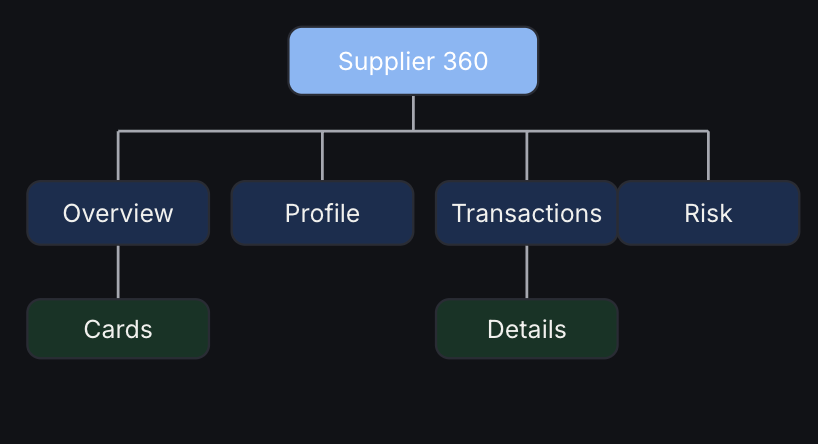
Information Architecture


Before: Dense information and layered navigation
After: Clearer hierarchy and flexibile layout
07/ THE FINAL SOLUTION
One workspace. Different priorities. Greater control.

Unified overview
Supplier information in one place

Default layout
Flexibile Cards
Resize and prioritize content

Resize a card

Clearer data hierarchy
Information easier to scan

Rearrange cards
Fiori consistency
Familiar enterprise interactions
08/ MY ROLE & COLLABORATION
Designing with users, product teams, and experts.
I worked across research, synthesis, information architecture, and interface design, incorporating feedback throughout the project.

End Users
Needs & workflows

Product Team
Requirements & feedback

Internal expert
Heuristic review
Better information experiences support better procurement decisions.
09/ PRODUCT & BUSINESS VALUE

Confidence
More interpretable data

Visibility
Supplier information in one place

Efficiency
Faster access to relevant information
Consistency
Reusable enterprise patterns
10/ VALIDATION & NEXT STEPS
What worked, what needed refinement, and what I’d measure next.
Expert Review
Recognizable patterns, clearer status cues, and layout flexibility.
Information retrieval
Time to locate supplier details
Workflow usability
Task completion rate
Information clarity
Interpretation accuracy
Personalization
Customization success rate
Further Refinement
Status consistency, whitespace, and end-user validation.
11/ Reflections & learnings
I came in thinking about screens. I left thinking about systems.
Supplier 360 helped me understand how research, business requirements, technical constraints, and user needs shape enterprise product decisions.
The biggest takeaway
Good enterprise design isn’t about making complex things look simple. It’s about making them easier to work with.
Think beyond screens
Understand the workflow first.
Balance constraints
Design for users and the business.
What I’d do differently today
Validate earlier. Measure better. Prioritize harder.
I’d test key tasks earlier, define measurable success criteria, and prioritize improvements based on user value and implementation effort.
Let research reshape the brief
Find the deeper problem.
Keep iterating
Question assumptions through feedback.
bottom of page