top of page


BDO INDIA
From keeping track of deadlines to keeping work on track.

Designing a connected tax calendar and task management experience to help professionals stay informed, coordinate responsibilities, and act on time.
Research Strategy
Enterprise UX
Web + Mobile
My role
UX Designer
Who I designed for
Tax professionals managing compliance deadlines
Focus
Connected tax calendar and task management
Timeline
Two months
Jun & July 2021
IMPACT AT A GLANCE
A calendar that turns compliance dates into coordinated action.
The proposed redesign brought supplier information into a clearer, configurable workspace; helping address visibility, navigation, and flexibile challenges identified through research.

Visibility
Upcoming compliance dates, always in view

Ownership
Every task has a clear owner

Follow-through
Progress tracked to completion
01/ THE CHALLENGE
A missed deadline is more than a missed date.
Tax professionals manage recurring obligations, regulatory changes, and responsibilities across teams. Knowing when something is due is only one part of the process. They also need to know what needs to happen, who is responsible, and whether the work is complete.
The design question
How might we help tax professionals move from tracking deadlines to taking timely, coordinated action?
02/ UNDERSTANDING THE USER
Designing for the people responsible for getting it right.
Shilpa Mehta
Representative persona · Chartered Accountant · 32
Responsible for filing GST returns and staying informed about compliance deadlines and regulatory updates.
Goal
Keep track of deadlines and complete compliance tasks on time.
Four moments shaped the workflow
Discover
01
These scenarios informed the feature list, task flows, and product structure, connecting discovery and reminders with task action and completion.
02
Get reminded
Challenge
Keeping up with new regulations and changes to compliance due dates.
03
Take action
04
Complete
03/ STRUCTURING THE EXPERIENCE
Structure first. Screens second.
We translated the project requirements into task flows and a sitemap, defining how users would move between the calendar, tasks, notifications, and dashboard.
Dates and filters
Calendar

Create and assign
Tasks
Tax Calendar

Notifications
Reminders and updates

Dashboard
Work and progress
Different devices. Different navigation needs.

Mobile
Bottom navigation
Selected over a hamburger menu to keep primary destinations visible.

Desktop
Side navigation
Selected over top navigation to provide persistent access to key product areas.
The following navigation design decisions were made after conducting A/B tesing with employees.
04/ The product experience
From deadlines to done.
01 / Onboarding
Get started with clarity
The login and product tour screens introduced users to the application and its core task-creation functionality.
Introduce key functionality in context, helping first-time users discover how to create tasks.
Design Rationale
03 / Task Creation
Turn deadlines into responsibilities.
The task creation flow brought together dates, priorities, assignees, subtasks, and reminders.
Make ownership, urgency, and timing explicit when work is created.
Design Rationale
05 / Dashboard
Make progress visible, not just activity.
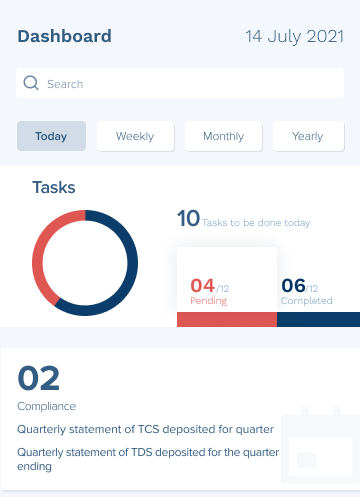
The dashboard design brought together task summaries and assigned work, including completed, pending, and rejected tasks.
Support a consolidated understanding of outstanding work and progress.
Design Rationale
Iteration mattered
The calendar received multiple wireframe iterations because it needed to accommodate several types of information and interaction within one screen.
Five connected experiences supported the journey from entering the product to managing compliance work and tracking progress.
02 / Calendar
One calendar. Multiple ways to plan.
Monthly and weekly views supported different planning needs, with compliance dates and tasks accessible within the calendar experience.
Support both forward planning and a focused view of immediate obligations.
Design Rationale
04 / Notifications
Keep important work visible.
The notification experience displayed task assignments and updates, with actions such as marking work complete or rejecting a task.
Bring relevant updates and actions together to support timely follow-up.
Design Rationale




Designing for operational clarity, not just a better calendar.
05/ BUSSINESS AND PRODUCT VALUE
Connecting compliance dates with task management created opportunities to improve how teams plan, coordinate, and follow through on work.

Compliance visibility
Design capabilities: Calendar views, filters, reminders
Potential business value
Help professionals identify upcoming obligations and plan ahead.
Success measure: On-time completion rate
Team accountability
Design capabilities: Assignments, priorities, task status
Potential business value
Make responsibility and progress easier to follow.
Success measure: Tasks with assigned owners

Workflow efficiency
Design capabilities: Connected planning and task actions
Potential business value
Reduce fragmentation between tracking deadlines and managing work.
Success measure: Time to create and assign tasks
.png)
Management visibility
Design capabilities: Dashboard and work summaries
Potential business value
Support visibility into pending and completed work.
Success measure: Overdue task percentage
06/ OUTCOME & CONTRIBUTION
From requirements to a defined product experience.
The documented work progressed through personas, use-case scenarios, task flows, a sitemap, navigation comparisons, and iterative wireframes for web and mobile. User testing with client employees was also included in the studio process.
My contribution
Working alongside the UX Lead, I contributed to scenario development, workflow mapping, information architecture, navigation exploration, and interface wireframes, while learning to communicate design decisions through client-facing deliverables.
07/ REFLECTIONS & LEARNINGS
What this project taught me.
01
Clarity comes before screens
Mapping enterprise requirements helped me understand how workflows and information architecture shape the experience.
02
Design is a team conversation
Working with a UX Lead taught me how important it is to communicate decisions clearly to clients and developers.
03
The details make the difference.
Iterating on the calendar showed me how information hierarchy and interaction decisions affect usability.
FINAL TAKEAWAY
Good enterprise UX makes complex work easier to navigate.
An early experience in connecting user needs, business requirements, and product decisions to make complex workflows more manageable.
bottom of page